Category: Technology and Internet

Everything related to technology and the Internet. Tutorials, projects, news…

  • Creating a NEP5 Token on NEO network

    In this post I will try to introduce a way of creating a digital token, that doesn’t rely on the Ethereum network, neither on their ERC20 standard.

    Other than Ethereum there are several other blockchain implementations that ofter the possibility of running smart-contracts and therefore allowing the creation of new digital tokens.

    The option that I will address today is NEO, through its NEP5 standard. I will not elaborate on the advantages and disadvantages between the 2 approaches, given that it will depend on many factors and your current situation (perhaps a future post, but there are many other publications that already did that exercise).

    A key difference for tokens based on NEO is that you have multiple choices regarding how do you write your smart-contract, instead of relying just on `Solidity`. If this is better or worse, that’s another discussion as well.

    For today’s post I will write everything in python, and use neo-python to compile the smart-contract and run the network node that will be used to deploy it on the blockchain.


    Brief Introduction to NEO

    Shortly, NEO is a blockchain project that has been around for a while, that intends build a smart economy over a distributed network. In other words and in practice, it is a platform with many similarities to Ethereum, with some key differences on some philosophical aspects and technical decisions.

    It was founded in China during the year of 2014 and has been gaining momentum recently, outside of their home country there are many people working on this platform, perhaps the most well known is an international community called City of Zion (CoZ)that develops open source tools and organizes all kinds of events and initiatives to support this project.

    As you will see in a later stage of this post, we will use one of CoZ’s tools to connect to the network and to manage “our” smart-contracts.

    The NEP5 Standard

    As it happens with Ethereum, NEO allows you to run smart contracts, therefore you can create your own tokens over this network/platform and for example run an “Initial Coin Offering” (ICO).

    The ecosystem benefits if all these tokens do have a common interface, so like the ERC20 (now EIP20) there is the NEP5 standard (the document can be found here). Complying with this common interface is highly advisable, since it will make the management of the token using most wallets easier for your users.

    As a small overview, so you can be aware of the simplicity of the proposed interface, your smart-contract should implement at least the following methods: totalSupply, name, symbol, decimals, balanceOfand transfer.

    Of course there are many other things that are required to make your smart-contract and respective token usable, such as initialization procedures and configuration of certain parameters like the total amount of tokens, how many decimals it has, which wallet should be the owner, etc. In this post we will stick with the basics.

    The smart-contract

    As it was said before, I will use python throughout the remaining of this post. Since the examples present in the proposal document are in C#, I will base the rest of the article on “NEO ICO Template” provided by the Neon Exchange, which is implemented in python, complies with NEP5 and has all the remaining utilities implemented.

    A detailed post about how to use this template already exists and can be found here. Some sections of that article are already a bit out-dated, but it remains very informative nevertheless. To avoid duplicating content, I will provide a lighter version and show how we can make use of the built-in neo-python features instead of calling the smart-contract methods directly, demonstrating how NEP5 standard can also make you users life easier.

    The Node and deployment

    So lets start!

    Assuming you already have the neo-python installed (if you don’t, you can follow the instructions here), the first think you should do is to launch the `prompt` and open your wallet:

    $ np-prompt -p
    ...
    open wallet {{wallet_path}}

    If you cloned the repository it will be something like:

    $ python neo/bin/prompt -p 
    ...
    open wallet {{wallet_path}}

    Next we will download the example smart-contract code in another terminal window:

    $ git clone git@github.com:neonexchange/neo-ico-template.git

    Before we build the smart-contract, we will need to edit a few settings that will be exclusive for our token. On the {{path_to_smartcontract}}/nex/token.py file, lets edit a few parameters (there are several others you could change, but lets stick to the basics here):

    # nex/token.py
    TOKEN_NAME = 'Example ICO Token'
    TOKEN_SYMBOL = 'EIT'
    TOKEN_OWNER = b'{{your_wallet_script_hash}}'
    

    To get the {{your_wallet_script_hash}} just type wallet on the terminal window running neo-python and you should see something like this [I 180506 20:50:38 UserWallet:538] Script hash b'SCRIPT HASH HERE' <class 'bytes'> printed on the terminal. Just copy it to your contract code and you’re done.

    The other options include changing the amount of tokens, how many will be initially “minted” and added to the owner’s wallet, etc.

    Now it is time to “compile” the smart-contract from python to the NEO’s virtual machine “format”. To do that, run the following command on the “prompt”:

    build {{path_to_smart-contract}}/ico_template.py 0710 05 True False

    The extra arguments are:

    • 0710 – Parameter types ( 07 is string, 10is a array).
    • 05 – Is the return type, in this case it means bytearray.
    • True – It requires storage.
    • False – It doesn’t use dynamic invocation.

    Now an ico_template.avm should had been created, we will use this file to deploy our smart-contract to the blockchain. To do so, you will need `GAS` (400 of it, check here the values) and since this is just a test a better approach is to use the test network (or even a private network) in order to avoid wasting funds. To deploy the smart-contract you should run:

    import contract {{path_to}}/ico_template.avm 0710 05 True False

    and follow the interactive instructions. After this final step the smart-contract should be ready to use.

    Using the newly created token

    Now that everything is deployed and we are ready to start using our new token, the first thing that we need to do is to “run” the deploy instruction in order to setup the initial amount of tokens. To deploy we need to find get the hash of the imported contract and invoke it with the deploy parameter.

    contract search {{query for your contract}}
    # grab the "hash" value
    testinvoke {{hash}} deploy []
    

    Then we can add this token to our wallet and interact with it using a friendlier interface than having to invoke manually the methods of the contract like we did with the deploy action. We achieve this with the command: import token {{hash}}.

    At this point you will be able to see your new token balance when you check your wallet, something similar to the following snippet:

        "synced_balances": [
            "[NEO]: 1000.0 ",
            "[NEOGas]: 25099.999 ",
            "[EIT]: 2499980 "
        ],
    

    From now on, to send tokens to someone else, instead of doing something like this:

    testinvoke 0xfd941304d9cf36f31cd141c7c7029d81b1efa4f3 transfer ["AUiPgh9684vjScBDJ5FFsYzBWyJjf6GQ6K","ASfh5fCf6jZ2RxKNoDfN6dN817B9kaNRgY", "10"]

    you have this friendlier interface:

    wallet tkn_send EIP AUiPgh9684vjScBDJ5FFsYzBWyJjf6GQ6K ASfh5fCf6jZ2RxKNoDfN6dN817B9kaNRgY 10

    If you check the help command, you will see that you have a few helper methods to easily interact with your NEP5 token:

    wallet tkn_send {token symbol} {address_from} {address to} {amount} 
    wallet tkn_send_from {token symbol} {address_from} {address to} {amount}
    wallet tkn_approve {token symbol} {address_from} {address to} {amount}
    wallet tkn_allowance {token symbol} {address_from} {address to}
    wallet tkn_mint {token symbol} {mint_to_addr} (--attach-neo={amount}, --attach-gas={amount})
    wallet tkn_register {addr} ({addr}...) (--from-addr={addr})
    

    And we just finished this small tutorial. To sum it up, I’ve made a small video going through the whole process:


    Given the popularity of the “blockchain” movement nowadays, we are starting to have several alternative networks that are able to run smart-contracts, some of them more mature than the others, but many of them very capable.

    Playing with several of the competing alternatives before jumping to the implementation phase of our solution is important, so we can understand which one will be a better fit for our particular situation.

    If you have been following this field for the last few years, you know it is moving rapidly and many breakthroughs are still happening. Nevertheless at this moment we already have solid foundations for building decentralized applications on top of the blockchain, for this purpose NEO is positioning itself as solid solution to take into account.

  • Django Friday Tips: Adding RSS feeds

    Following my previous posts about RSS and its importance for an open web, this week I will try to show how can we add syndication to our websites and other apps built with Django.

    This post will be divided in two parts. The first one covers the basics:

    • Build an RSS feed based on a given model.
    • Publish the feed.
    • Attach that RSS feed to a given webpage.

    The second part will contain more advanced concepts, that will allow subscribers of our page/feed to receive real-time updates without the need to continuously check our feed. It will cover:

    • Adding a Websub / Pubsubhubbub hub to our feed
    • Publishing the new changes/additions to the hub, so they can be sent to subscribers

    So lets go.

    Part one: Creating the Feed

    The framework already includes tools to handle this stuff, all of them well documented here. Nevertheless I will do a quick recap and leave here a base example, that can be reused for the second part of this post.

    So lets supose we have the following models:

    class Author(models.Model):
    
        name = models.CharField(max_length=150)
        created_at = models.DateTimeField(auto_now_add=True)
    
        class Meta:
            verbose_name = "Author"
            verbose_name_plural = "Authors"
    
        def __str__(self):
            return self.name
    
    
    class Article(models.Model):
    
        title = models.CharField(max_length=150)
        author = models.ForeignKey(Author, on_delete=models.CASCADE)
    
        created_at = models.DateTimeField(auto_now_add=True)
        updated_at = models.DateTimeField(auto_now=True)
    
        short_description = models.CharField(max_length=250)
        content = models.TextField()
    
        class Meta:
            verbose_name = "Article"
            verbose_name_plural = "Articles"
    
        def __str__(self):
            return self.title
    

    As you can see, this is for a simple “news” page where certain authors publish articles.

    According to the Django documentation about feeds, generating a RSS feed for that page would require adding the following Feedclass to the views.py (even tough it can be placed anywhere, this file sounds appropriate):

    from django.urls import reverse_lazy
    from django.contrib.syndication.views import Feed
    from django.utils.feedgenerator import Atom1Feed
    
    from .models import Article
    
    
    class ArticlesFeed(Feed):
        title = "All articles feed"
        link = reverse_lazy("articles-list")
        description = "Feed of the last articles published on site X."
    
        def items(self):
            return Article.objects.select_related().order_by("-created_at")[:25]
    
        def item_title(self, item):
            return item.title
    
        def item_author_name(self, item):
            return item.author.name
    
        def item_description(self, item):
            return item.short_description
    
        def item_link(self, item):
            return reverse_lazy('article-details', kwargs={"id": item.pk})
    
    
    class ArticlesAtomFeed(ArticlesFeed):
        feed_type = Atom1Feed
        subtitle = ArticlesFeed.description
    

    On the above snippet, we set some of the feed’s global properties (title, link, description), we define on the items() method which entries will be placed on the feed and finally we add the methods to retrieve the contents of each entry.

    So far so good, so what is the other class? Other than standard RSS feed, with Django we can also generate an equivalent Atom feed, since many people like to provide both that is what we do there.

    Next step is to add these feeds to our URLs, which is also straight forward:

    urlpatterns = [
        ...
        path('articles/rss', ArticlesFeed(), name="articles-rss"),
        path('articles/atom', ArticlesAtomFeed(), name="articles-atom"),
        ...
    ]
    

    At this moment, if you try to visit one of those URLs, an XML response will be returned containing the feed contents.

    So, how can the users find out that we have these feeds, that they can use to get the new contents of our website/app using their reader software?

    That is the final step of this first part. Either we provide the link to the user or we include them in the respective HTML page, using specific tags in the head element, like this:

    <link rel="alternate" type="application/rss+xml" title="{{ rss_feed_title }}" href="{% url 'articles-rss' %}" />
    <link rel="alternate" type="application/atom+xml" title="{{ atom_feed_title }}" href="{% url 'articles-atom' %}" />
    

    And that’s it, this first part is over. We currently have a feed and a mechanism for auto-discovery, things that other programs can use to fetch information about the data that was published.

    Part Two: Real-time Updates

    The feed works great, however the readers need continuously check it for new updates and this isn’t the ideal scenario. Neither for them, because if they forget to regularly check they will not be aware of the new content, neither for your server, since it will have to handle all of this extra workload.

    Fortunately there is the WebSub protocol (previously known as Pubsubhubbub), that is a “standard” that has been used to deliver a notification to subscribers when there is new content.

    It works by your server notifying an external hub (that handles the subscriptions) of the new content, the hub will then notify all of your subscribers.

    Since this is a common standard, as you might expect there are already some Django packages that might help you with this task. Today we are going to use django-push with https://pubsubhubbub.appspot.com/ as the hub, to keep things simple (but you could/should use another one).

    The first step, as always, is to install the new package:

    $ pip install django-push
    

    And then add the package’s Feed class to our views.py (and use it on our Atom feed):

    from django_push.publisher.feeds import Feed as HubFeed
    
    ...
    
    class ArticlesAtomFeed(ArticlesFeed, HubFeed):
        subtitle = ArticlesFeed.description
    

    The reason I’m only applying this change to the Atom feed, is because this package only works with this type of feed as it is explained in the documentation:

    … however its type is forced to be an Atom feed. While some hubs may be compatible with RSS and Atom feeds, the PubSubHubbub specifications encourages the use of Atom feeds.

    This no longer seems to be true for the more recent protocol specifications, however for this post I will continue only with this type of feed.

    The next step is to setup which hub we will use. On the  settings.py file lets add the following line:

    PUSH_HUB = 'https://pubsubhubbub.appspot.com'
    

    With this done, if you make a request for your Atom feed, you will notice the following root element was added to the XML response:

    <link href="https://pubsubhubbub.appspot.com" rel="hub"></link>

    Subscribers will use that information to subscribe for notifications on the hub. The last thing we need to do is to tell the hub when new entries/changes are available.

    For that purpose we can use the ping_hub function. On this example the easiest way to accomplish this task is to override the Article  model save() method on the models.py file:

    from django_push.publisher import ping_hub
    
    ...
    
    class Article(models.Model):
        ...
        def save(self, *args, **kwargs):
            super().save(*args, **kwargs)
            ping_hub(f"https://{settings.DOMAIN}{reverse_lazy('articles-atom')}")
    

    And that’s it. Our subscribers can now be notified in real-time when there is new content on our website.

  • Upgrade your “neo-python” wallets

    Several weeks ago I started to explore the NEO ecosystem, for those who are not aware NEO is a blockchain project that just like Ethereum pretends to create the tools and the platform to execute smart-contracts and create new types of decentralized applications. It has its pros and cons just like any other system, but that is outside of the scope of this blog post.

    One of the defining characteristics of this “cryptocurrency” is the ability develop those smart-contracts in programming languages the user already is familiar with (however only a small subset of the language is available).

    So I searched for the available SDKs and found the neo-python project, which is a wallet software and also a set of tools to develop using the Python programming language. The project is developed by a community of supporters of the NEO ecosystem called City of Zion.

    And now the real topic of the post begins, while learning the features and exploring the codebase I found an urgent security issue with the way the wallets were being encrypted by neo-python.

    Long story short, the method used to protect the wallets wasn’t correctly implemented and allowed an attacker with access to the wallet file to decrypt it without the need for the password/pass-phrase (more details here) .

    Fortunately it is an actively developed project and the team responsible for it was quick to acknowledge the problem and merge the fix I proposed in a pull request. The fix is now present in the newer versions of the project, and it now forces the users to reset the security features of their wallets (check this video for more details, starting on minute 8 up to 10) .

    Now in this post I would like to leave my recommendation about how to proceed after re-encrypting the wallet, because even though the issue is fixed your private keys might have been compromised before you applied the patch. If you are a user and didn’t noticed nothing yet the most probable scenario is that you weren’t compromised, since most immediate thing an attacker could/would do is to steal your funds.

    Nevertheless, there is always the possibility and to avoid any bad surprises you definitely should:

    1. Properly encrypt your wallet using the reencrypt_wallet.py  script.
    2. Check the new generated wallet is working properly.
    3. Then delete the old wallet.
    4. Create a new wallet.
    5. Transfer your funds to the new wallet.

    The steps 4 and 5 are necessary because the fix protects your master key but it doesn’t change it and as I previously said if a copy of your vulnerable wallet exists (created by you or by an attacker) your funds are still accessible. So don’t forget to go through them.

    Other than this, the project is very interesting and while still immature it has been fun the work with it, so I will keep contributing some improvements in the near future.


  • Decentralized alternatives on the Internet

    This post follows a recent discussion about decentralization at the first Madeira Tech Meetup of 2018. I already touched these subjects previously here on the blog a couple of times (for example,  the one about Zeronet and the one about Mastodon), but this time I will try to summarize the key points of the issue and give a list of awesome projects and applications the will help you reduce your dependency on several centralized services.

    Nowadays many most popular web services and applications that “we” use are centralized, this means that the application and its data only exist on the machines of a single entity. As soon as this was considered normal, it led to another phenomenon, which these “apps” close down any possible interaction that is not under their control, to keep the user locked in. A good example is social media and their chat applications, since closing down the doors to open protocols and any form of interoperability, allows the network effect to keeps the users inside (why can’t someone with an account on a certain Google chat application, talk with someone who uses Facebook Messenger? you know, like email works).

    The Internet infrastructure at it’s core is decentralized, it was initially designed this way in order to be robust and continue working when there is a problem in any of member of the network. For many years the applications built on top it, followed some of this principals and were happy to have a certain level of interoperability with other software because it provided value. Since mid 00’s to this day things changed and many services and applications are as closed as they can be (the so called wallet gardens), because there are economic incentives to behave this way, making the users and their data “hostage”.

    Fortunately, the new rules of the European Union will start being implemented and enforced in the next couple of months. Other than giving back the control of their data to users, it requires that they must be able to export it in a common format, which will allow users to move to other competitors more easily.

    However, this new right still threatens some comfortable walled-garden models. For example, social networks, exercise-tracking apps, and photo services will have to allow users to export their posts, rides, and photos in a common format. Smart competitors will build upload tools that recognize these formats; GDPR might therefore help to bridge the strategic moats of incumbents.

    Source: Techies Guide to GDPR

    But it doesn’t solve all the centralization problems. So a better (and complementary) approach is to use applications and services that use open protocols and were built with interoperability in mind. If they are open source, if you can self-host them or if they are completely distributed, even better.

    So to give you a head start, here is a list of applications that address common usages in the Internet, that are open-source, decentralized and can easily replace popular software you use nowadays:

    • Matrix – Is an open chat protocol and collection of reference implementations (ready to use) that is an alternative to any chat application, you can use an existing server or launch your own.
    • Mastodon – is a Twitter alternative. Together with GNUSocial and other softwares, they form an open network that regardless of which service or software type you use, you are able to interact with everyone. You also can host your own server/instance.
    • IPFS – a content-based addressing protocol (with reference implementation) that tries to make the web more distributed and less reliant on central servers. Very useful to publish public data from your own computer.
    • ZeroNet – an alternative distributed network where websites are served by the peers in the network and not central servers. One of the nice things here is that you can easily clone and publish websites using standard templates.
    • Peertube – the name gives you a hint, it is a Youtube replacement that doesn’t depend any central server. It is federated and the video is distributed to the users by “Webtorrent”.
    • Syncthing – File synchronization application (alternative to Dropbox) that lets you have all your data up to date across all your devises and doesn’t rely on central servers.
    • OwnCloud/NextCloud – Also an alternative to Dropbox and similar services, were the user can self-host a server or use one available on the Internet. These servers are federated, which means you can share and work on the same folders even with users from another server or service.

    Like these ones there are many others available. I just highlighted the ones above because I think they are ready/stable and can “fight” with the existing centralized services.

    The usage of decentralized applications makes the Internet more democratic, more resistant to censorship, more resilient, makes the life harder to authoritarian entities, as well as others that try to centrally manipulate public perception (don’t automatically adding users to the famous “filter bubbles”) and reduces the probability of massive companies maintaining monopolies on certain markets.

    At first it might take a little bit of work, but the benefits are there and will be collected later.

  • Getting started with Blockchain and related technologies

    Crypto currencies have been at all rage in the last few months, with the price of Bitcoin and other Altcoins skyrocketing and achieving new all time heights.

    This is very interesting and since there is the idea that the technology supporting all of these coins is revolutionary, some saying it can be used to solve many problems that we currently struggle with (or turn thing more transparent). I needed to take a look at how it works internally.

    For anyone trying to understand and work with “Blockchain” and its new style of “consensus”, playing and just using the coins and wallets is not enough. All the things that happen in the background are complex and require the understand of several mathematical properties.

    So where to start?

    There are many books (and I’ve read a few of them), but some just approach the technology from an high level and from a user perspective. Others are good and complete, but very dense.

    I took another approach to complete my understanding of the internals of the technology. I joined and recently completed the online course of “Bitcoin and Cryptocurrency Technologies” from Princeton University, available on the Coursera platform.

    The content, even though the course dates from 2014/2015, is solid. It covers the basic concepts and the internals of bitcoin very well, foundational things that do not change that often. Content isn’t just thrown at you, they build up your knowledge on the matter.

    The only issue, in my humble opinion, is the timing of the first graded assignment, which is given to you before the lessons on those concepts are explained (but you can watch those lessons and comeback to the assignment later). On the remaining assignments some context and better explanation of the terms on the code might help, but eventually you end up understanding what they mean. Otherwise the discussion forums will guide you in the right direction.

    Overall, truly recommend this course (that is free at the moment) if you desire to get an initial and deeper knowledge of the system and not just the user perspective.

  • Making the most of your dusty Raspberry Pi

    Raspberry Pi was one of those projects that were “godsent” (just like Arduido). A cheap and very small computer that would let the little ones and also older folks learn, explore, prototype and build lots of things that  previously would be inaccessible to many.

    So in this post I want to give you some tips and ideas of things you could do with that Raspberry Pi you have unused in the drawer. The main objective is to set it up once, configure some services and utilities that are useful in several areas.

    Protect the entire household from Ads

    One awesome project you can easily install on your device is Pi-hole, which you can setup with a simple command and by changing the DNS entries of your router’s DHCP settings, it will let you have all of the devices in your network automatically “protected” against those Ad networks that try to track your Internet usage.

    Protect your communications when not at home

    Other tool that is very easy to setup and can help you when you are abroad or using insecure networks, is the PiVPN project. You will be able to create your own virtual private network, that will route your communications through your chosen network (home network for example), protecting the traffic and also letting you access your devices that are on the given network as well.

    Extra Tip: Use this together with the Pi-hole’s DNS server to block the advertisements and tracking requests anywhere you go, by adding:

    push "dhcp-option DNS <IP OF YOUR PI'S TUN0 INTERFACE>"

    to your “/etc/openvpn/server.conf” (a restart is needed) and changing the “Interface Listening Behavior” to “Listen on all interfaces” on Pi-Hole’s administration.

    Check who’s at Home or at the office

    This one is a little more tricky to setup, but it might worth it when you need to know when somebody is at home or at the office. The Pi-sensor-free-presence-detector, makes use of your local network to check which devices are connected and then you can link to a person based on who’s the owner.

    Other Stuff

    For those who want to take things one step further and take control of many of the usual web applications you can take a look at the Freedom Box project. You can install it on your Raspberry Pi and configure many applications on your own server.

  • Managing Secrets With Vault

    I’ve been looking into this area, of how to handle and manage a large quantity of secrets and users, for quite a while (old post), because when an organization or infrastructure grow, the number of “secrets” required for authentication and authorization increase as well. Is at this stage that bad practices (that are no more than shortcuts) as reusing credentials, storing them in less appropriate ways or no longer invalidating those who are no longer in required, start becoming problematic.

    Yesterday at “Madeira Tech Meetup” I gave a brief introduction to this issue and explored ways to overcome it, which included a quick and basic explanation of Vault and demo about a common use case.

    You can find the slides of the presentation here and if you have any suggestion or something you would like to discuss about it, feel free to comment or reach through any of the contact mediums I provided.

  • Search open tabs in Firefox

    A few days ago it was announced that next versions of Firefox will have huge improvements on performance and resource usage. This is great because browsers nowadays consume huge amounts of resources, making it harder for people with olders or weaker machines to use the computer without starting to pulling out their hair.

    I’m not a huge fan of having lots of opens tabs, but I know many people that like to work this way, having dozens of them open. One question I always ask is how they find the tab they are looking for, when just the favicons are shown on the tabs.

    It looks like Firefox makes it easy to handle this situation without any extra extension, just select the search bar in any tab (Ctrl+l) and then type “% <search query>” to search on the opens tabs.

    I hope this is useful to you.

  • Keep your dependencies under check

    Nowadays most software projects with a “decent size” rely on many software dependencies, or in other words: libraries and tools, developed by other people. That usually are under constant change.

    The reasons for these are clear and can go from implementing common patterns and avoid repeating ourselves, to accelerate the development, to use mature implementations and avoid some pitfalls, etc. Sometimes many projects rely on way too many dependencies for simples things (Remember the left-pad fiasco?).

    Once these dependencies are loaded, integrated and working as expected, people often forget they are there and many times they stay untouched for long periods of time. Even when newer versions are released, unless something starts breaking, nobody remembers to keep them up to date, a situation that might lead to security vulnerabilities, not in your code but on the code your project depends on.

    Of course I’m not telling you anything new, what I pretend to achieve with this post, is to show that there are many tools available to help you fight this problem. When you integrate them on your CI or on another step of your development process, they will keep you informed about what dependencies have known security vulnerabilities and what you should upgrade as soon as possible.

    The majority of the programming languages have this sort of tools, so a little search should help you find the one that better suits you stack. Below are some examples:

    As an example here is what I needed to do in order to check the dependencies of Hawkpost (an open-source project that I’m deeply involved with at the moment):

    $ safety check --full-report -r requirements/requirements.txt
    safety report
    ---
    No known security vulnerabilities found

    For most of these tools the basic check is this simple to do and in the long run it might save you from some headaches.

    Update (26-06-2018): Added cargo-audit to the list

  • Federated Tweets, or Toots

    Recently there was been a big fuss about “Mastodon“, an open-source project that is very similar to twitter. The biggest difference is that it is federated. So what it means?

    It means that it works like “email”, there are several providers (called instances) where you can create an account (you can setup your own server if you desire) and accounts from different providers can communicate with each other, instead of all information being in just one silo.

    Of course for someone that is in favor of an open web this is a really important “feature”.

    Another big plus is that the wheel wasn’t reinvented, this network is inter-operable with the existing “GNU Social” providers (uses the same protocol), so you can communicate and interact with people that have an account in an instance running that software. It can be seen like 2 providers of the same network running different software packages (one in PHP the other in Ruby) but talking the same language over the network.

    I haven’t tested it much yet, but given it is a push for a solution that is not centralized (which is a rare thing nowadays) and I think it is a small step in the right direction, So I’ve setup an individual instance for myself where I will publish regularly links of posts/articles/pages that I find interesting. Feel free to follow at https://s.ovalerio.net and if you know someone worth following in this network, let me know.

    Here are a few links with more information:

    List of instances where you can create an account

  • The wave of bloated desktop apps

    Some time ago I complained about a mindset that was producing a form of “bloated” software (software that uses a disproportionate amount of resources to accomplish “simple” tasks). Later I even posted an example of a popular chat application consuming a ridiculous amount of memory, given the its purpose.

    One recent example of this phenomenon is the recent explosion of electron desktop applications. Today the following post reached the front page of Hacker News, and it makes a good argument:

    Electron is flash for the desktop

    https://josephg.com/blog/electron-is-flash-for-the-desktop/

  • Pixels Camp 2016

    A few weeks ago took place in Lisbon the first edition of Pixels Camp (aka Codebits 2.0), an event that I try to attend whenever it happens (see previous posts about it). It is the biggest technology focused event/conference in Portugal with a number of attendees close to 1000.

    This year the venue changed to LX Factory, even though the place is really cool, it is not as well located as the previous venue, at least to people who don’t live in Lisbon and arrive to the airport. The venue was well decorated and with a cool atmosphere, giving you the feeling that it was the place to be. However, this year there was less room for the teams working on the projects and not everybody was able to get a table/spot (it appeared to me that the venue was a little bit smaller than the previous one).

    From the dozens of great talks that were given on the 4 stages of the event, many of whose I was not able to see since I was competing in the 48h programming competition, bellow are two that I really liked:

    Chrome Dev Tools Masterclass

    IPFS, The Interplanetary Filesystem

    If you have some curiosity you may find the remaining on their youtube channel.

    All this is great but the main activity of Pixels Camp is the 48h programing competition and this year we had another great batch of cools projects being developed (total of 60, if I remember correctly).

    As usual I entered the contest, this time with the fellow Whitesmithians, Rui and Pedro. We chose to develop a GPS based game, you know, since it seemed to be a popular thing this summer and we though the medium still has great potential to do really entertaining stuff.

    The idea already had a few years but never had been implemented and at its core was quite simple. It took some ideas from the classic game “pong” and adapted it to be played in a fun way while navigating through a real world area.

    We called it PonGO and essentially the users must agree on a playing field, such as city block, a city or even bigger areas, then they connect their phones and the ball starts rolling. The players have to move around with their phones (which they use to see the map and track everyone’s position) trying to catch the ball and throw it to the other side of the map. The player that is able to do it more times wins the game. Here is sketch we did while discussing the project:

    Initial Sketch
    Initial Sketch

    As you can see in the above image, that would be on the phone’s screen, the player (in yellow) reached close enough to the ball so it can play it, now he has to change the direction to one of the opposite sides (marked as green). The other players (in blue), will have to run to catch the ball before it gets out. Spread across the map you can see some power ups that give users special capabilities.

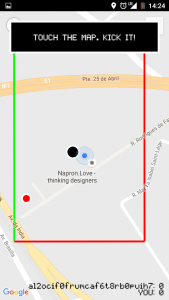
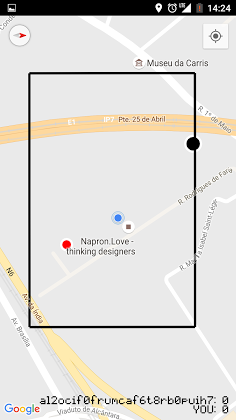
    That’s it, it might seem easy but doing it in less that 48h is not. We ended with a working version of the game but the power ups were not implemented due to time constrains. Here are some screenshots of the final result(we used the map view instead of the satellite view so it might look a little different):

    In game screenshotsIn game action

    The code itself is a mess (it was an hackathon what were you expecting) and can be found here and here.

    At the end, it was a great event as usual and I would also like to congratulate some of my coworkers at Whitesmith that took home the 7th place in the competition. Next year I hope to be there again (and you should too).

  • EU-Free and Open Source Software Auditing project

    Today I stumbled on this blog post about a poll for the EU-FOSSA. I’m not familiarized with all aspects of this pilot project, however by the information I could gather, it seems to be a really great idea.

    Most of us regularly use, up to a certain degree, several pieces of free (as in freedom) software on a daily basis. Many of these projects are essential to assure the security of our communications, documents and work. European institutions and countries make use of these tools as well, so why not spend a little time and money to assure they meet certain quality goals and are free of major bugs that can undermine the safety of its users?

    This will also raise the public’s trust on these tools, so they can become standards over their proprietary counterparts, which we are unable to review and modify according to our needs, leading to many security questions.

    One of its components is a sample review of one open-source project and until the 8th day of July you can give your opinion on which one. Go there it only takes 1 minute and it will help them understand that this is an important issue. Here is the link

  • Test driving ZeroNet

    A few weeks ago the “Decentralized Web Summit” took place in San Francisco, even though there was a video stream available at the time, I wasn’t able to watch it, but later I saw some excerpts of it. One of the talks that caught my attention was about a new thing called ZeroNet. It seemed to be some kind of network where the assets and the contents of the websites are fetched from your peers while introducing clever mechanisms to give the owners control and allowing the existence of user generated content. It grabs concepts from either bitcoin and bittorrent, but for a better explanation bellow is an introduction by the creator of this technology:

    The presentation is very high level, so on the website I found some slides with more details about how it works and I must say it is very interesting from a technical perspective, it even has an address naming system (“.bit”) if you don’t want to have some gibberish on the address bar.

    Watching the video things seamed to be working pretty well (for something that was being presented for the first time), so I decided to join the network and give it a try. For those using docker it happens to be pretty easy, just run:

    $ docker run -d -v <local_data_folder>:/root/data -p 15441:15441 -p 43110:43110 nofish/zeronet

    then your node will be available on: http://127.0.0.1:43110/

    After using it for 2 weekends, I have to say the level of polish of this project is amazing, all the pre-built apps work pretty well and are easy to use, the websites load super fast (at least in comparison with my expectations) and changes show up in real-time. The most interesting aspect of all was the amount of people trying and using it.

    You may ask, what are the great advantages of using something like this? Based on what I’ve seen during these few days there are 3 points/use cases where this network shines:

    • Websites cannot be taken down, as long as there are peers serving it, it will be online.
    • Zero infrastructure costs (or pretty close) to run a website there, you create and sign the content, it gets delivered by the peers.
    • Website that you visit remain available while you are offline.

    So to test this network further, I will do an experiment. During the next few weeks/months I will mirror this blog and make the new contents available on ZeroNet, starting with this post. The address is:

    http://127.0.0.1:43110/1PLZ7PjfX91VSMmzU5revwswmrEkTz6Mpk

    Note: In this initial stage it might not be always available, since at the moment I’m the only peer serving it from my laptop.

    To know more about it, check the repository on Github.

  • Django Friday Tips: Timezone per user

    Adding support for time zones in your website, in order to allow its users to work using their own timezone is a “must” nowadays. So in this post I’m gonna try to show you how to implement a simple version of it. Even though Django’s documentation is very good and complete, the only example given is how to store the timezone in the users session after detecting (somehow) the user timezone.

    What if the user wants to store his timezone in the settings and used it from there on every time he visits the website? To solve this I’m gonna pick the example given in the documentation and together with the simple django-timezone-field package/app implement this feature.

    First we need to install the dependency:

     $ pip install django-timezone-field==2.0rc1

    Add to the INSTALLED_APPS of your project:

    INSTALLED_APPS = [
        ...,
        'timezone_field',
        ...
    ]

    Then add a new field to the user model:

    class User(AbstractUser):
        timezone = TimeZoneField(default='UTC'

    Handle the migrations:

     $python manage.py makemigration && python manage.py migrate

    Now we will need to use this information, based on the Django’s documentation example we can add a middleware class, that will get this information on every request and set the desired timezone. It should look like this:

    from django.utils import timezone
    
    
    class TimezoneMiddleware():
        def process_request(self, request):
            if request.user.is_authenticated():
                timezone.activate(request.user.timezone)
            else:
                timezone.deactivate()

    Add the new class to the project middleware:

    MIDDLEWARE_CLASSES = [
        ...,
        'your.module.middleware.TimezoneMiddleware',
        ...
    ]

    Now it should be ready to use, all your forms will convert the received input (in that timeone) to UTC, and templates will convert from UTC to the user’s timezone when rendered. For different conversions and more complex implementations check the available methods.